Almost every guide to deploying an application securely describes the same picture: a VPC, private subnets for compute and database, a public subnet for load balancers, a bastion host, a security group per tier. It is a good picture. It is also written for a company with a platform team, and it is handed to people deploying their first application.
What follows is the same subject arranged by size instead. Four stages, and for each one: what it buys, what it costs, the signal that says move on, and a check you can actually run.
The check matters more than the diagram. Every stage below has a claim attached, and a claim nobody tests is decoration.
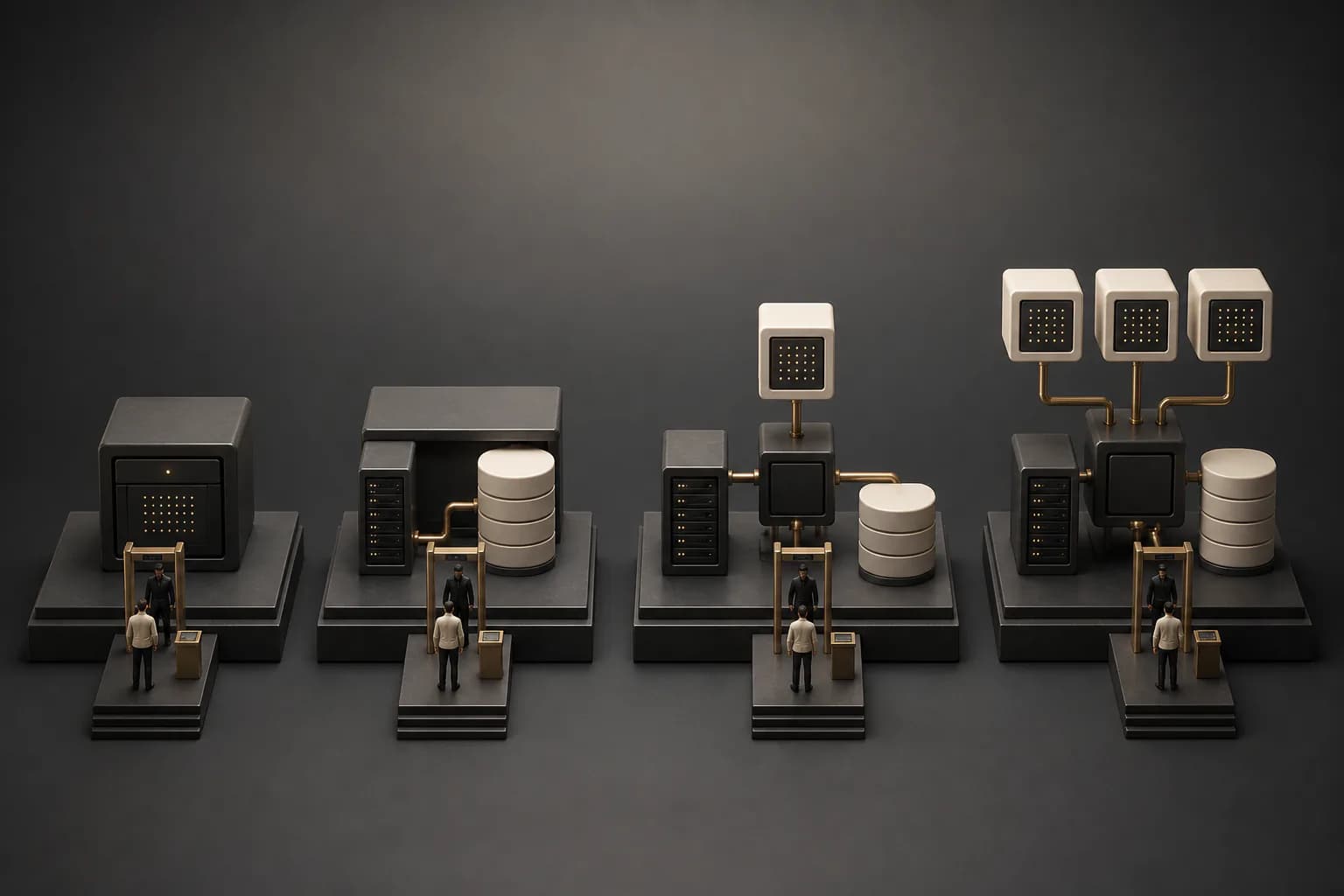
Stage 1: one machine
One host, one Docker network, everything reachable from everything else inside it. This is where most people start and where a surprising amount of production quietly lives.
The instinct is that this stage has no security. That is wrong. It has three things, and they carry more weight than the subnet diagram does:
- Nothing binds to a public port except the proxy. Your database listens on the internal network or on a socket. Not on 0.0.0.0.
- Credentials are per process. The service that serves requests does not hold the credential that can delete rows. This is the one that keeps working no matter how the network is arranged, and it is the one people skip.
- TLS terminates somewhere you control, with certificates that renew without you.
The check: from a machine that is not the host, try to reach the database port directly.
nc -vz your-host 5432
# Expected: refused or timeout. If it connects, the rest of this post is moot.
Run it from somewhere outside your own network, because a firewall rule that allows your office and a firewall rule that allows the world look identical from your desk.
Move on when: a second person needs access, or an incident would mean restoring from a backup you have never tested, or one process going down takes everything with it.
Stage 2: a managed platform
A platform runs the host for you: containers, TLS, restarts, secrets, and usually a database. What changes is not the security model, it is who is responsible for the parts you were forgetting.
What it buys is real. Certificate renewal, patched base images, a restart policy that works, and a place to put secrets that is not a file on a laptop.
What it costs is that the boundary is now somebody else's and you cannot see it. Two services on the same platform may share more than you think. Read what its network model actually is rather than assuming isolation you were not promised.
The check: deploy a throwaway service on the same platform and, from inside it, try to reach your real database.
# Inside the throwaway container:
getent hosts your-db-host
nc -vz your-db-host 5432
# If a container you just created can reach your production database,
# the platform is a convenience layer and not a boundary.
This is the check nobody runs, and it is the one that reclassifies a platform from boundary to convenience in about thirty seconds.
Move on when: you have data you would have to disclose if it leaked, or a compliance question you cannot answer with "the platform handles it".
Stage 3: a network you define
Now the diagram earns its place. A private subnet for compute, a private subnet for data, and the only thing in a public subnet is what has to be.
What this buys is a mistake budget. Once the database has no route to the internet, a misconfigured service cannot expose it by accident, and a dependency that decides to phone home cannot. That is worth a lot, and it is the first stage where the network is doing work no application code could do.
What it costs is that every problem now has one more layer to check. A connection that used to fail for one reason now fails for four, and three of them are invisible from the application. Budget for that, and write down the routing you chose while you still remember why.
Two things worth knowing before you draw it:
- Pick your address ranges deliberately. Overlapping ranges is the mistake that only surfaces the day you peer two networks, and by then both are in production.
- Egress is a rule too. Most people restrict what can come in and leave outbound wide open, which is exactly the direction data leaves in.
The check: from inside the database subnet, try to reach the open internet.
curl -m 5 https://example.com
# Expected: timeout. A database that can browse the web
# can also upload your tables somewhere.
Move on when: more than one team deploys here, or one environment's mistake can reach another's data.
Stage 4: separate accounts, and a way in
The last stage is not a bigger network, it is a harder boundary: separate accounts or subscriptions per environment, so that production is not one typo away from staging. A bastion, or better a broker that needs no open port at all, is how humans reach anything private.
Worth saying plainly: a bastion host is a machine with a public SSH port whose entire job is to be trusted. If your provider offers session-based access through its own control plane, or you can run a mesh network, you get the same reachability without publishing a port. Prefer that. The classic bastion is in every diagram because the diagrams are older than the alternatives.
The check: take the credentials for the non-production account and try to list production resources.
aws sts get-caller-identity          # confirm which identity you are
aws s3 ls --profile staging          # then reach for something in prod
# Expected: AccessDenied. Not "empty list", which can also mean
# you are looking in the wrong place and would hide a real grant.
That distinction is the whole reason to run it. A permission test that cannot tell "denied" from "nothing there" has not tested anything.
What I would actually tell someone starting out
Pick the stage your situation is in, not the stage in the diagram. Skipping ahead is not caution, it is complexity you cannot debug at three in the morning, and complexity you cannot debug is its own outage.
The thing that transfers across all four stages is not the network. It is that a service holds only the credentials it needs. That works on one box, on a platform, in a VPC and across accounts, and it is the only control here that keeps working when the network is arranged badly.
And run the checks. Every stage above has one, they take minutes, and each one can fail. A control you have never watched fail is a comment, not a control.
If you want the rest of what I have written on this, five Terraform anti-patterns covers what the code around this tends to look like, what actually runs your infrastructure when you use SST follows one abstraction down to the provider underneath, CDKTF is archived is what to do when a tool in that chain stops, eleven projects behind a UI is the migration when the platform stops fitting, and three lists drifted from their registry is the failure mode all of it shares.
Next
What is missing here is the cost column. Every stage has a real monthly figure attached, and I have deliberately not guessed at one, because it depends on the provider, the region and how much of it is idle. That wants a comparison with actual bills rather than a table I made up.
Which stage are you on, and what pushed you there? I am most interested in the moves that turned out to be premature, because those are the ones nobody writes up.
Written from running both ends: Azure infrastructure with Terraform for DAX-40 corporations, OTC and AWS at T-Systems, and a single host with roughly thirty services on it. Where a stage is something I have read rather than run, the text says so.
Building something similar?
I write about setups I actually use. If you're working on something comparable, I'd be curious what your workflow looks like.